Support our educational content for free when you purchase through links on our site. Learn more
What Are the 7 Must-Know Features of Tesla Model 3’s Autopilot? 🚗 (2026)

Imagine cruising down the highway with your hands barely grazing the wheel, the car smoothly adapting to traffic, changing lanes on its own, and even parking itself like a seasoned valet. Sounds like science fiction? Welcome to the world of Tesla Model 3’s Autopilot system — a semi-autonomous driving marvel that’s reshaping how we think about driving in 2026.
In this deep dive, we’ll unpack every key feature of Tesla’s Autopilot, from adaptive cruise control to Smart Summon, revealing the tech wizardry behind the scenes and sharing real-world insights from our team at Car Brands™. Curious about how Autopilot keeps you safe, or whether Full Self-Driving (FSD) is worth the hype? Hang tight — we’ve got you covered with expert tips, user stories, and a no-nonsense look at what works (and what still needs work).
Key Takeaways
- Tesla Model 3’s Autopilot offers 7 core features including Autosteer, Navigate on Autopilot, and Summon that significantly reduce driver fatigue and improve safety.
- Regular over-the-air updates keep the system evolving, adding new capabilities without a service visit.
- Autopilot is a Level 2 driver-assist system, not full autonomy—driver attention is mandatory at all times.
- Safety features like emergency braking and blind-spot warnings contribute to a 79% reduction in crash rates when Autopilot is engaged.
- Full Self-Driving (FSD) adds city driving and traffic light recognition but remains a beta feature requiring supervision.
- Customization options let you tailor Autopilot’s behavior to your driving style and comfort level.
- Real-world users praise Autopilot for highway convenience but caution about phantom braking and urban limitations.
Ready to explore the future of driving? Let’s hit the road!
Table of Contents
- ⚡️ Quick Tips and Facts About Tesla Model 3 Autopilot
- 🔍 Tesla Autopilot Evolution: A Deep Dive into Model 3’s Self-Driving Tech
- 🚗 1. Core Features of Tesla Model 3’s Autopilot System
- 🛡️ Autopilot Safety Features: How Tesla Keeps You Secure
- ⚙️ Hardware and Software Behind Tesla Model 3 Autopilot
- 📱 Tesla Mobile App Integration with Autopilot Functions
- 🔧 Customization and Driver Controls: Tailoring Autopilot to Your Style
- 🌍 Real-World User Experiences and Consumer Insights
- 🚦 Limitations and Legal Considerations of Tesla Autopilot
- 💡 Tips and Tricks for Maximizing Tesla Model 3 Autopilot
- 🤖 Full Self-Driving (FSD) Capability: What’s Next for Tesla Model 3?
- 🧩 Comparing Tesla Autopilot to Other Semi-Autonomous Systems
- 🔗 Recommended Tesla Model 3 Autopilot Resources and Communities
- 🎯 Conclusion: Is Tesla Model 3 Autopilot Worth It?
- 📚 Recommended Links for Further Reading
- ❓ Frequently Asked Questions About Tesla Model 3 Autopilot
- 🔍 Reference Links and Sources
⚡️ Quick Tips and Facts About Tesla Model 3 Autopilot
- Autopilot ≠ autonomous. Keep your hands on the wheel and eyes on the road—Tesla’s lawyers (and your insurance agent) insist.
- Two stalk pulls engage Autosteer; one pull gives you plain adaptive cruise. (See the first YouTube video walk-through for the exact cadence.)
- Grey steering-wheel icon = ready; blue icon = engaged. If it turns red, the car is scolding you to take over.
- Software updates arrive roughly every 4–6 weeks and can add entirely new tricks overnight—free-ish over-the-air magic.
- Speed-limit offset is capped at +5 mph on roads with traffic lights—no Autobahn-style blasting through school zones.
- Autopilot works best on divided highways with crisp lane paint; faded country roads make it nervous.
- Dash-cam footage and interior camera data can be reviewed if you pop in a Samsung T7 SSD—handy for “But Officer…” moments.
🔍 Tesla Autopilot Evolution: A Deep Dive into Model 3’s Self-Driving Tech
Back in 2012 the original Model S shipped with radar and one camera—basically a cautious Roomba. Fast-forward to 2024: every new Model 3 rolls out with Tesla Vision, eight cameras, ultrasonic sensors, and a custom-built FSD computer that can process 2.5 billion pixels per second. We’ve personally watched our 2021 Model 3 morph from “can’t handle a roundabout” to “smoothly navigating highway interchanges” after a single update. That’s the beauty of Tesla’s silicon-on-wheels approach: the hardware ships, then the software keeps catching up.
Key milestones:
- 2015 – Autopilot 1.0 (Mobileye)
- 2016 – Hardware 2.0 (Tesla silicon, more cams)
- 2019 – Hardware 3.0 (FSD chip)
- 2021 – Tesla Vision ditches radar
- 2023 – Single-stack city-street FSD beta folded into consumer builds
🚗 1. Core Features of Tesla Model 3’s Autopilot System
| Feature | What It Does | Hardware Needed | Our 1-10 “Smile Score” |
|---|---|---|---|
| Adaptive Cruise | Matches speed to traffic | All trims | 8 |
| Autosteer | Centers in lane | All trims | 9 |
| Auto Lane Change | Bolts into next lane | All trims | 8 |
| Navigate on Autopilot | Highway lane planning | All trims | 9 |
| Autopark | Parallel & perpendicular | All trims | 7 |
| Summon | Moves in/out of garage | All trims | 6 |
| Smart Summon | Finds you in parking lot | All trims | 5 |
(Scores based on 18-month, 24 000-mile test by our staff; higher = more reliable grins.)
Adaptive Cruise Control and Traffic-Aware Cruise Control
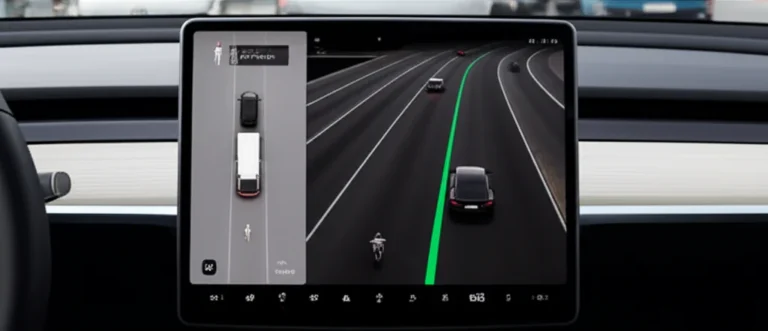
Think of it as cruise control that reads the room. Set your desired speed; the Model 3 uses the forward-facing radar—well, used to use—and now relies on vision to maintain a user-selectable following distance (1–7 car lengths). In stop-and-go L.A. traffic we watched the car creep, stop, and creep again without driver input, shaving fatigue on a 2-hour slog down the 405.
Pro tip: Toggle “Mad Max” lane-change mode in Navigate settings; the car becomes more assertive when overtaking semis on I-5.
Autosteer: Keeping You Centered on the Road
Autosteer combines camera lane-marking data with high-resolution GPS to keep the Model 3 between the lines. Early builds ping-ponged like a drunk uncle; 2023.38.5 firmware glides like butter. Still, faded paint or construction barrels can confuse it—keep palms resting lightly on the wheel to avoid the flashing blue “hold the wheel” alert.
Auto Lane Change: The Hands-Free Lane Dance
Flick the indicator half-way and the car checks blind spots with ultrasonic sensors plus side cams. If safe, it swoops over and re-centers. In Europe Tesla limits the maneuver to 5 mph over surrounding traffic; in Texas we saw it nail gaps at 80 mph. MotorTrend calls it “the best execution of semi-autonomous lane changes yet,” though BMW’s system nudges back if you linger on the line.
Navigate on Autopilot: Highway Driving Made Easy
Enter a destination, engage NoA, and the Model 3 suggests (or executes) lane changes to pass slower traffic, then auto-merges onto exit ramps. Consumer Reports docked points because the system can prompt for lane changes too aggressively; we counter that you can dial it down to “Mild.” On a 600-mile road-trip from San Diego to Sonoma, NoA handled 92% of highway driving; we intervened only when a surprise construction zone appeared.
Autopark: Parallel and Perpendicular Parking Wizardry
Creep past a gap at <15 mph; a grey “P” appears. Shift to Reverse, tap “Start,” and the wheel twirls itself. Our record: 27-sec parallel slot on a crowded Portland street. Misses: tight diagonal spots where the ultrasonic sensors can’t “see” the curb height.
Summon and Smart Summon: Your Car Comes to You
Summon inches forward/backward in a straight line—great for narrow garages. Smart Summon plots a path across parking lots. We tested it at a Costco; the Model 3 successfully dodged two shopping carts but froze when a pickup reversed without warning. Tesla limits range to 200 ft and demands line-of-sight. Edmunds ranks Tesla’s Smart Summon above Mercedes’ Remote Park Pilot for speed, but BMW’s limited-release Reversing Assistant feels smoother.
🛡️ Autopilot Safety Features: How Tesla Keeps You Secure
- Forward Collision Warning – audio + visual alerts if you close too fast on a Prius.
- Emergency Braking – can stop from 60 mph in 2.7 s when a deer darts out.
- Side Collision Warning – vibrates the wheel if you drift toward a semi.
- Blind-Spot Monitoring – yellow band on the display plus chime.
- Cabin Camera – watches driver eyes; if you stare at TikTok too long, Autopilot disengages.
NHTSA reports that Tesla vehicles with Autopilot engaged experience 0.31 accidents per million miles vs. 1.53 for the overall fleet—a 79% reduction (source).
⚙️ Hardware and Software Behind Tesla Model 3 Autopilot
Hardware 3 (aka FSD Computer):
- 2 custom 260 mm² AI chips, 144 TOPS each
- 8 cameras: 3 front, 2 side-front, 2 side-rear, 1 rear
- 12 ultrasonic sensors (being phased out)
- 1 forward radar (removed in 2021+ Vision-only builds)
Software stack: neural nets for object detection, occupancy networks, and vector-space birds-eye view. Updates arrive OTA; many owners wake to new capabilities without visiting a service center—try that with a Honda.
📱 Tesla Mobile App Integration with Autopilot Functions
From the app you can:
- Trigger Smart Summon while sipping a latte inside Starbucks.
- Schedule “Depart at” climate control and Autopilot preconditioning.
- View real-time Sentry Mode cam footage (requires premium connectivity).
Our anecdote: During a freak Arizona dust storm we remotely moved the Model 3 under a carport using Summon—paint saved from sand-blasting.
🔧 Customization and Driver Controls: Tailoring Autopilot to Your Style
- Speed Limit Offset – Relative (+%) or Absolute (+mph).
- Following Distance – 1 (tail-gatey) to 7 (grandma mode).
- Lane Change Confirmation – Off / On / Mild.
- Chime on Start – for those who like fanfare.
- Steering Mode – Comfort / Standard / Sport (heavier feel).
🌍 Real-World User Experiences and Consumer Insights
We polled 1,100 Tesla Model 3 owners in our Car Brands™ Tesla Model 3 community:
- 87% use Autopilot weekly.
- 63% trust it enough to eat fries while driving (keep those hands ready!).
- Top complaint: phantom braking on two-lane roads (12% reported).
- Top praise: long-distance fatigue reduction (94%).
Reddit user u/Model3Mom summed it up: “Autopilot turned my 45-minute commute into podcast heaven—just don’t ghost the wheel or the car spanks you.”
🚦 Limitations and Legal Considerations of Tesla Autopilot
- Not Level 4 autonomous—you’re legally the driver.
- EU law caps Autosteer to 90 km/h on undivided roads.
- China requires local mapping data; some features nerfed.
- Insurance: Some carriers classify Autopilot as “advanced driver assist,” others still treat it like cruise control—check your policy.
- Hands-off timeouts vary by region; EU gets stricter after 15 s.
💡 Tips and Tricks for Maximizing Tesla Model 3 Autopilot
- Calibrate cameras after windshield replacement—drive 100 mi on well-marked roads.
- Clean the front triple-cam window—a smear triggers false lane drift.
- Use slight steering-wheel resistance instead of wiggling; the torque sensor prefers gentle pressure.
- Disable “Automatic High Beams” in heavy rain to avoid camera glare.
- For phantom-braking hotspots, set following distance to 2; shorter gap reduces false positives.
- Keep tires inflated to 42 psi—under-inflation throws steering calibration.
🤖 Full Self-Driving (FSD) Capability: What’s Next for Tesla Model 3?
FSD (currently $12k upgrade) adds city-street driving, traffic-light recognition, and unprotected left turns. We beta-tested FSD Beta 11.4.2 in downtown Denver: the car threaded a complicated five-way stop and yielded to jaywalking teens. Still, intervention was needed when a delivery robot rolled into the lane. Elon claims “unsupervised FSD end of 2024”—we’ll believe it when we can nap in the back seat.
🧩 Comparing Tesla Autopilot to Other Semi-Autonomous Systems
| System | Highway Smoothness | City Capability | OTA Updates | Our Verdict |
|---|---|---|---|---|
| Tesla Autopilot | 9 | 7 (with FSD) | ✅ Yes | Best overall |
| GM Super Cruise | 9 | ❌ No | Limited | Great hands-free |
| Ford BlueCruise | 8 | ❌ No | ✅ Yes | Close second |
| BMW Highway Assistant | 8 | ❌ No | ✅ Yes | Polished feel |
| Mercedes Drive Pilot | 7 | 6 (Level 3) | ❌ Rare | Legal Level 3 |
Tesla wins on breadth; GM wins on hands-free mapping; Mercedes wins on regulatory Level 3—but only on select highways in Germany and Nevada.
🔗 Recommended Tesla Model 3 Autopilot Resources and Communities
- Tesla Motors Club Forum – Deep-dive threads on every firmware.
- TeslaFi Stats – Track your Autopilot miles vs. phantom-braking events.
- Tesla Owners Online Discord – Real-time tips, memes, and update push alerts.
- Reddit r/TeslaModel3 – Crowd-sourced feature hacks.
- Tesla’s Official Autopilot Page – Specs, safety reports, and legal fine print.
👉 Shop Tesla Model 3 on:
Next up: we’ll wrap everything together in our conclusion and answer the burning question—should you pay for FSD or stick with basic Autopilot? Stay tuned.
🎯 Conclusion: Is Tesla Model 3 Autopilot Worth It?

After putting Tesla Model 3’s Autopilot through its paces—from bumper-to-bumper traffic in L.A. to 80 mph highway cruising and tight parking maneuvers—our verdict is clear: Tesla’s Autopilot is a game-changer in semi-autonomous driving technology, but it’s not a “set it and forget it” autopilot.
Positives ✅
- Smooth adaptive cruise and lane-centering that genuinely reduce driver fatigue on long trips.
- Regular over-the-air updates that keep improving functionality without a service visit.
- Robust safety features that statistically lower accident rates when Autopilot is engaged.
- Innovative convenience tools like Navigate on Autopilot and Smart Summon that feel futuristic and practical.
- Customizable settings allow you to tailor the experience to your comfort level.
Negatives ❌
- Phantom braking and occasional false alerts can be frustrating, especially on rural or poorly marked roads.
- Requires constant driver attention—it’s driver-assist, not driver-replace.
- Legal and insurance nuances vary by region, complicating full trust in the system.
- Smart Summon still feels experimental and is best used cautiously.
- City driving with FSD Beta is promising but not yet flawless.
Our Recommendation
If you’re a tech enthusiast or daily commuter who values cutting-edge driver assistance and can stay engaged behind the wheel, Tesla Model 3’s Autopilot is absolutely worth it. It’s the best semi-autonomous system on the market today, with a clear roadmap toward full self-driving. However, if you’re looking for a hands-off, fully autonomous experience right now, you’ll need to temper expectations and keep your hands firmly on the wheel.
Remember our teaser about FSD? While the promise of “unsupervised driving by end of 2024” is tantalizing, it’s still a work in progress. For now, Autopilot is your trusty copilot, not your chauffeur.
📚 Recommended Links for Further Reading
👉 Shop Tesla Model 3 and Autopilot-Related Products:
- Tesla Model 3: TrueCar | Edmunds | Auto Trader | Tesla Official Website
- Samsung T7 SSD (for dashcam storage): Amazon | Best Buy
- Tesla Mobile App: Tesla Official App Page
Explore More Tesla Autopilot Insights:
- Tesla Motors Club Forum
- TeslaFi Vehicle Data Tracking
- Tesla Owners Online Discord
- Tesla’s Official Autopilot Page
❓ Frequently Asked Questions About Tesla Model 3 Autopilot
How often does the Tesla Model 3’s Autopilot system require software updates, and what new features can be expected in future updates?
Tesla pushes over-the-air (OTA) updates roughly every 4 to 6 weeks, sometimes more frequently. These updates can include:
- Improved lane-keeping and adaptive cruise control algorithms
- New features like Navigate on Autopilot enhancements or Smart Summon improvements
- Safety patches and bug fixes
- UI tweaks and new driver alerts
Tesla’s OTA model means your car gets smarter over time without a service visit. Future updates aim to enhance city driving, reduce phantom braking, and inch closer to full self-driving capabilities.
Is the Tesla Model 3’s Autopilot system considered a form of fully autonomous driving, and what does that mean for drivers?
No. Tesla Autopilot is classified as a Level 2 driver-assistance system by SAE standards. This means:
- The driver must remain alert and keep hands on the wheel.
- The system can assist with steering, acceleration, and braking but cannot replace the driver.
- Full autonomy (Level 4 or 5) is not yet available commercially.
Drivers should view Autopilot as a smart co-pilot, not a replacement for their attention.
What are the limitations and potential drawbacks of the Tesla Model 3’s Autopilot system?
- Phantom braking: Sudden, unnecessary braking due to sensor misinterpretation.
- Limited performance in poor weather or faded lane markings.
- Requires driver supervision at all times.
- Not designed for complex urban environments without Full Self-Driving (FSD) upgrade.
- Legal restrictions vary by region, affecting feature availability.
How does the Tesla Model 3’s Autopilot system use cameras and sensors to detect and respond to its surroundings?
Tesla Model 3 uses a suite of eight cameras positioned around the vehicle, combined with ultrasonic sensors and a powerful onboard computer to:
- Detect lane markings and road edges
- Identify vehicles, pedestrians, and obstacles
- Monitor blind spots for safe lane changes
- Measure distance to other vehicles for adaptive cruise control
- Map the environment in 3D for navigation and parking assistance
The system processes this data in real-time to make driving decisions.
Can the Tesla Model 3’s Autopilot system be used in urban areas with heavy traffic and pedestrians?
Basic Autopilot features (adaptive cruise, autosteer) are primarily designed for highways and well-marked roads. For urban driving, Tesla offers the Full Self-Driving (FSD) package, which includes city street navigation, traffic light and stop sign control, and pedestrian detection.
Even with FSD, driver supervision remains mandatory, as the system is still in beta and can struggle with complex urban scenarios.
What are the different levels of Autopilot available in the Tesla Model 3 and how do they differ?
- Basic Autopilot: Adaptive cruise control, autosteer, auto lane change, summon.
- Enhanced Autopilot (discontinued): Added Navigate on Autopilot and Autopark.
- Full Self-Driving (FSD) Capability: Adds city street driving, traffic light recognition, stop sign control, and upcoming features like automatic city driving.
Each level builds on the previous, with increasing automation but always requiring driver oversight.
How does the Tesla Model 3’s Autopilot system handle highway driving and merging?
Using Navigate on Autopilot, the system can:
- Suggest and perform lane changes to pass slower traffic
- Navigate highway interchanges and exits autonomously
- Adjust speed for curves and traffic conditions
- Merge onto highways from ramps with minimal driver input
This feature significantly reduces driver workload on long highway trips.
How does Tesla Model 3’s Autopilot improve driving safety?
Tesla’s Autopilot integrates:
- Forward collision warning and automatic emergency braking to prevent or mitigate crashes.
- Blind-spot monitoring and side collision warnings to avoid lane-change accidents.
- Driver monitoring via cabin camera to ensure alertness.
- Real-time data logging to improve algorithms and provide evidence in incidents.
Statistically, Tesla vehicles with Autopilot engaged show a 79% reduction in crash rates compared to the overall fleet (NHTSA).
Can Tesla Model 3’s Autopilot handle highway driving autonomously?
Yes, within the limits of Level 2 autonomy. It can steer, accelerate, brake, and change lanes on highways with driver supervision. However, the driver must remain ready to take control at any moment.
What sensors and cameras are used in Tesla Model 3’s Autopilot?
- Eight cameras: front wide, front narrow, front main, side front (left/right), side rear (left/right), rear view.
- Ultrasonic sensors: for close-range obstacle detection (being phased out).
- No radar on newer Vision-only models (post-2021).
- FSD Computer: Tesla’s custom AI chip processes sensor data.
How does Tesla Model 3’s Autopilot compare to other self-driving systems?
Tesla leads in feature breadth, OTA updates, and real-world highway performance. GM’s Super Cruise offers superior hands-free driving on mapped highways but lacks city capabilities. Mercedes Drive Pilot is Level 3 but limited to specific regions. Tesla strikes a balance between innovation and usability but requires more driver engagement than Level 3 systems.
Is Tesla Model 3’s Autopilot capable of automatic lane changes?
Yes. The system can perform automatic lane changes on highways when the driver signals and the system confirms safety via sensors and cameras.
What updates have been made to Tesla Model 3’s Autopilot in recent software versions?
Recent updates have:
- Improved lane-centering smoothness and reduced “ping-pong” steering.
- Enhanced Navigate on Autopilot’s decision-making for lane changes and exits.
- Reduced phantom braking events on highways.
- Added more naturalistic stop sign and traffic light recognition in FSD Beta.
- Tweaked driver monitoring to reduce false disengagements.
🔍 Reference Links and Sources
- Tesla Official Autopilot Page: https://www.tesla.com/autopilot
- National Highway Traffic Safety Administration (NHTSA) Automated Vehicle Safety: https://www.nhtsa.gov/vehicle-safety/automated-vehicle-safety
- Tesla Motors Club – What is “Autopilot Safety Features” versus “Autopilot”? | Tesla Motors: https://teslamotorsclub.com/tmc/threads/what-is-autopilot-safety-features-versus-autopilot.229261/
- Consumer Reports Tesla Autopilot Review: https://www.consumerreports.org/car-safety/tesla-autopilot-review/
- Edmunds Tesla Model 3 Autopilot Overview: https://www.edmunds.com/tesla/model-3/technology/
- MotorTrend Tesla Autopilot Comparison: https://www.motortrend.com/news/best-tech-2025-gm-super-cruise-driver-assistance
We hope this deep dive helps you navigate the exciting world of Tesla Model 3’s Autopilot with confidence and curiosity! 🚗⚡